I am quite fond of having different plants spread throughout the house. It takes a bit of forethought, as I always need to check if they are cat safe first. Despite how much effort I put into keeping them alive, sometimes they just die. This became incredibly frustrating, and I decided to take a smarter approach and use smart plant sensors to try and keep them alive and well.
Heads up
Even though I have been using the plant sensors for over two years, some plants will still randomly just die.
This is by no means a foolproof way to keep plants alive!
I already run Home Assistant so it was only natural that I added the plant sensors into it.
Materials
Plants
Xiaomi MiFlora plant sensors (Bluetooth)1 (between 15 and 20€)
ESPHome Bluetooth proxies2 (4 to 10€ each, but they are not required specifically for this, you can leverage existing ones)
Home Assistant components
homeassistant-plant - the central component that creates the plant entities in Home Assistant.
home-assistant-openplantbook - used to retrieve generic plant details, ie, how much to water them or how much light they need.
lovelace-flower-card - used to display the plant information in a nice, easy to read card.
All of these are custom components, but they are really easy to install via HACS, the Home Assistant Community Store.
When creating the plant entity, you pick the species and the openplantbook component automatically retrieves the the recommended ranges for each.
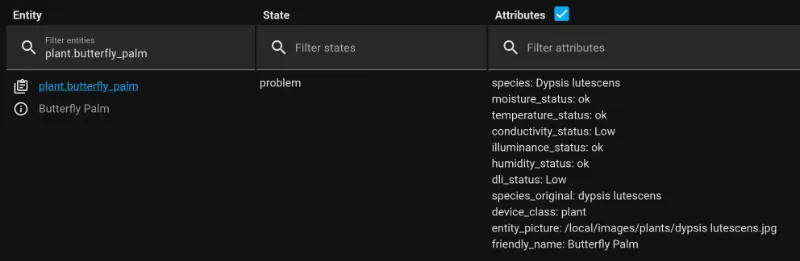
Each plant entity gives you a binary state (ok/problem), and the attributes tell you how each of the different measured items are within the acceptable range. They are:
soil moisture,
temperature,
soil conductivity (corresponding to quantity of minerals on the soil),
illuminance (the current amount of light being received),
dli, daily light integral (the accumulated amount of light received today),
air humidity, which isn’t measured by the Xiaomi MiFlora sensors, but you can take them from a Temperature/Humidity sensor, if you have one.
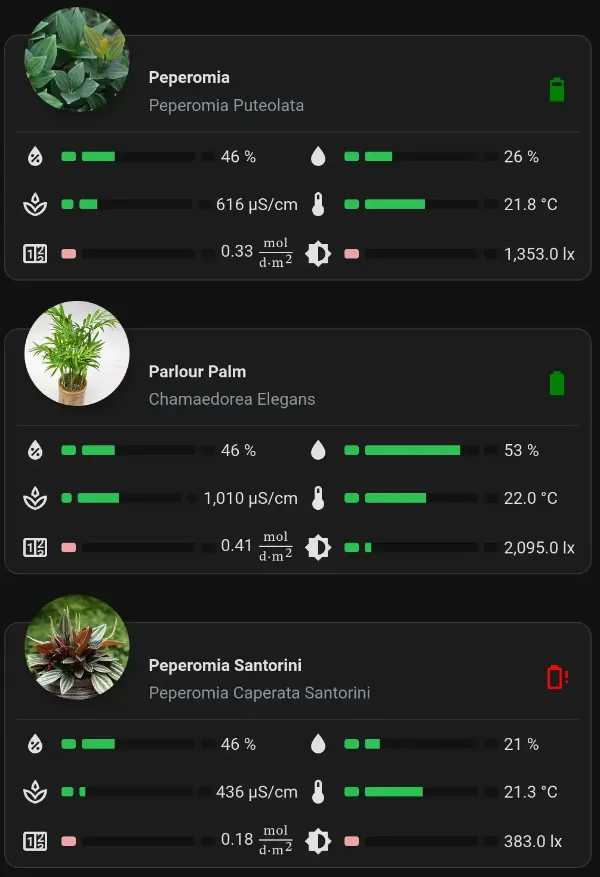
The plant entity details within Home Assistant.Each plant's information gets displayed in a neat card. I am using the compact version, but the symbols correspond to (top to bottom, left then right): air humidity, soil conductivity (ie, quantity of minerals on the soil), accumulated light received today, soil humidity, temperature, and light received.
Automating notifications
To make my life easier, rather than checking the cards each time, I have set up automations to let me know a plant needs watering, or plant food.
You can set up an automation with a trigger based on the problem status:
trigger: stateentity_id: - plant.butterfly_palm - plant.peperomia - plant.mistletoe_cactus - plant.*every other plantfrom: okto: problem
If you have multiple plants, listing every single one gets old fast!
Instead, you can use a template that returns true in case anyplant entity is in state “problem”:
It is then easy to create actions whenever one needs attention.
The notification for plants that need attention
I have gone a bit beyond this. The only actionable issues on the plants are moisture, soil conductivity or temperature. If a plant isn’t getting enough sunlight (because it is cloudy or raining outside), there’s not much I can do. So while I’d monitor those items, on a daily basis what I am doing is watering plants, adding fertilizer, and ensuring they are neither too hot nor too cold. As such, I’ve ended up with an automation that looks a bit more complex:
The automation checks for any plant entity in a “problem” status, and then selects all of those that have either moisture, conductivity or temperature in a “Low” status.
For each of those plants, it then sends a separate notification letting me know what the issue is with that particular plant.
YAML for the automation
alias: Plant Notificationsdescription: Plant Monitoring Notificationstriggers: - trigger: template value_template: >- {% set ns = namespace(results=[]) %} {% for p in states.plant | selectattr('state', 'eq', 'problem') %} {% if p.attributes.get('moisture_status') == 'Low' or p.attributes.get('conductivity_status') == 'Low' or p.attributes.get('temperature_status') == 'Low' %} {% set ns.results = ns.results + [p.entity_id] %} {% endif %} {% endfor %} {{ ns.results | count > 0 }} for: hours: 0 minutes: 30 seconds: 0actions: - repeat: for_each: >- {% set ns = namespace(results=[]) %} {% for p in states.plant | selectattr('state', 'eq', 'problem') %} {% if p.attributes.get('moisture_status') == 'Low' or p.attributes.get('conductivity_status') == 'Low' or p.attributes.get('temperature_status') == 'Low' %} {% set ns.results = ns.results + [p.entity_id] %} {% endif %} {% endfor %} {{ ns.results }} sequence: - action: notify.all data: title: Plants message: >- {% set attrs = { 'Moisture': state_attr(repeat.item, 'moisture_status'), 'Soil Conductivity': state_attr(repeat.item, 'conductivity_status'), 'Temperature': state_attr(repeat.item, 'temperature_status') } %} {% set low_attrs = attrs.items() | selectattr('1', 'eq', 'Low') | map('join', ': ') | list %} The {{ state_attr(repeat.item, 'friendly_name') }} needs some attention! {{ low_attrs | join('\n') }} data: channel: Plants timeout: "1800" clickAction: /lovelace/plants - delay: hours: 24 #to ensure I don't get notified more than once a day minutes: 0 seconds: 0 milliseconds: 0mode: single
The timeout automatically dismisses the message after 30 minutes, to avoid cluttering my phone.
The “clickAction” means that if I click the notification on the phone I am taken to my plants dashboard, so that I can view the cards and check which plants need to be taken care of.
Conclusion
This is a very simple way to try and keep the plants alive. Considering the price of the sensors, one could argue that you might be better of buying a new plant each time one dies. I still feel better knowing I am doing all I can - and a reminder on the phone when it is time to water a plant really helps.
I have found that, overall, having the sensors does help in keeping plants alive longer. Yes, some of them still die randomly (maybe I am not good enough at this!), but even those seem to last longer than what they did when I had no sensors at all. And some of my other plants are really thriving! One in particular, the Fishbone Cactus (Epiphyllum anguliger) has been doing so well that I have managed to propagate small cuts from it into 2 new pots.
Footnotes
I’ve looked into different options, and found these to be by far the cheapest, especially if bought in bulk. They do go through something like a CR2032 battery every 9 to 12 months. ↩
I have plants spread out throughout the house, with some even outside. ESPHome Bluetooth Proxy functionality allows any of my ESP32 devices to pick up the Bluetooth signal and relay it to Home Assistant. They are not needed specifically for this, they just help in ensuring you can cover a wider area. ↩