When I had my EV charger installed, back in 2022, I did not yet have solar panels installed. The charger unit itself, a Wallbox Pulsar Plus, has support for solar charging, but it requires a specific power metering device.
When my installation was done, the installer used a different power metering device, so I actually can’t use the built in functionality.
Rooting the Wallbox for local control
The Wallbox Pulsar Plus has a working cloud based integration in Home Assistant, but as you can imagine that is not responsive nor reliable enough to allow solar based charging.
I had seen mentions of a few hacks allowing for local control, but those mostly relied on having an old firmware version. My device is currently on version 6.7.38.
A few days ago an updated version was made available by jagheterfredrik on GitHub. He published an updated rooting method, as well as an updated mqtt-bridge allowing local control of the Wallbox charger.
libcrypto errors when connecting over SSH due to the very old server version running on the Wallbox
If you hit this error, you can use a workaround, by connecting with a compatible version of a SSH client using a container.
Just clone the repo and run this from inside its folder, replacing with the correct ip address:
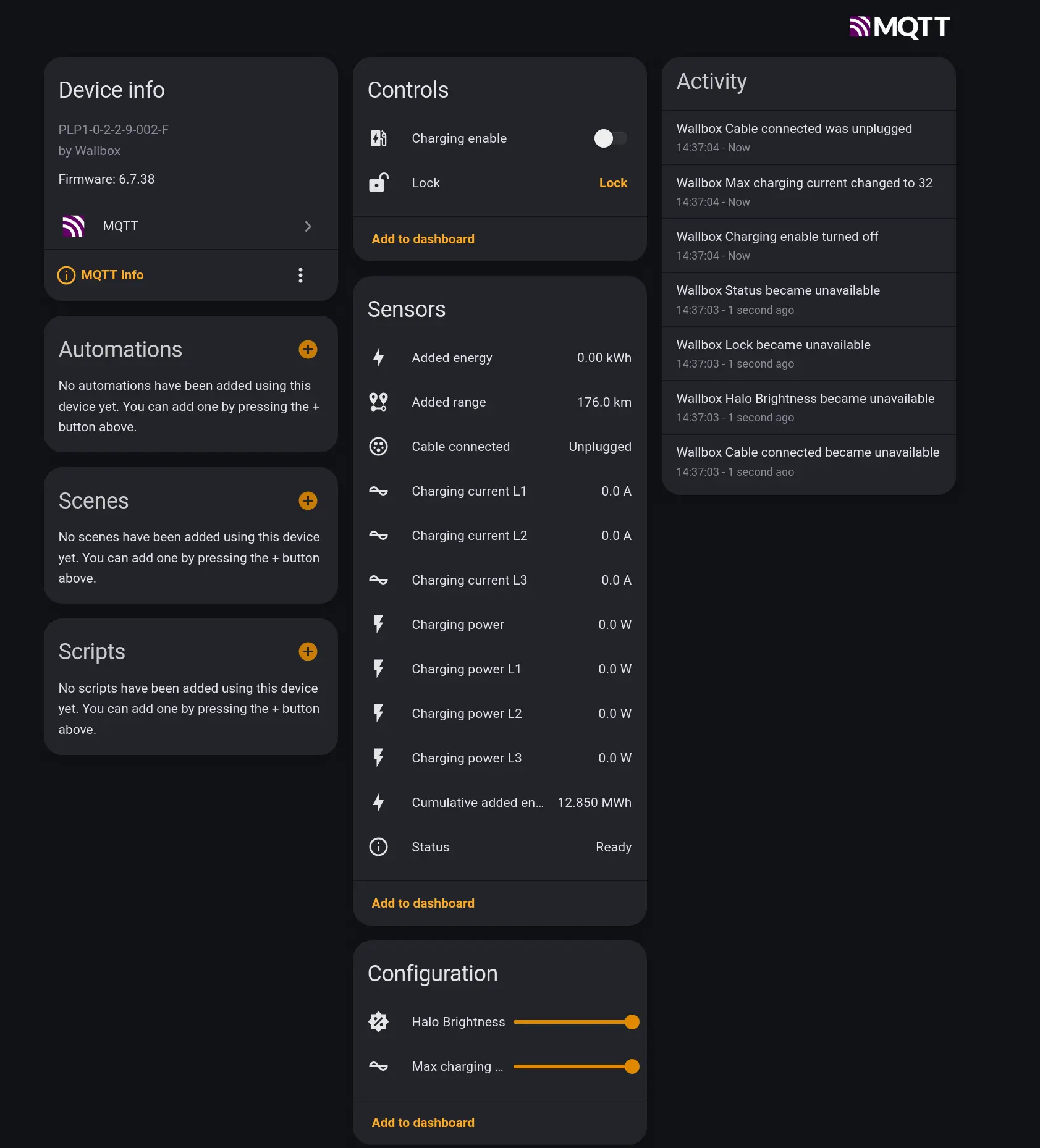
The MQTT-Bridge is ready-made for Home Assistant MQTT Auto Discovery, allowing it to integrate seamlessly with Home Assistant. All it takes is connecting both to the same MQTT broker, and the Device will show up automatically.
The MQTT controls and sensors available via Home Assistant
Setting up an Automation to use solar excess power
I created an automation to control the charger, using the Solar PV excess production.
I have a “switch” (a boolean helper) in Home Assistant that needs to be switched on for this to work.
My EV usually charges on a schedule, as I have a time of use energy tariff with a cheap rate between 2 and 5 am. On a typical day, I sell my excess solar back to the grid during the day, and then charge the car only in that cheaper night period.
However, as a 2 EV household, there are some days where that window might be insufficient. The idea is to use the excess solar to top up the car during the day.
Requirements
an EV charger which you can control from Home Assistant
control switch (switch.wallbox_charging_enable)
current setting, in my case set in A, from 6-32A (number.wallbox_max_charging_current)
power monitoring (sensor.wallbox_charging_power) to be able to tell the difference between the grid load and the EV charger load.
Grid Power sensors (in my case, a sensor.grid_power from a Shelly EM monitoring my grid connection)
“Solar EV Charging” helper boolean (input_boolean.ev_solar_charging)
“Solar EV Charger last updated” date-time helper ( input_datetime.ev_charger_last_adjusted)
The automation
Triggers on grid power crossing the 1500W export threshold, a 2-minute “update window”, and the solar boolean changing state. The 1500W are arbitrary, but they roughly correspond to the 6A minimum charging power required.
If the boolean is turned off, immediately stops the Wallbox, resets to 32A, and exits. This is so it resumes charging on the scheduled window at the full power.
Calculates true solar surplus as wallbox_power - grid_power, accounting for what the car is already drawing.
If surplus is insufficient, waits 5 minutes for recovery before stopping charging (to account for temporary cloud cover, for example).
If surplus is sufficient, recalculates and sets the charging current (6-32A) every 2 minutes, only enabling the Wallbox switch if it wasn’t already on.
I came up with the logic myself, but used a LLM to review and clean up the code, as well as to help document it, to make it easier to read.
The Automation YAML code
alias: EV Solar Excess Chargingdescription: > Charge EV using solar export surplus only. Min watts threshold (1500) = round figure approximating 6A * 245V grid midpoint. Turn-off threshold differs: 1500W when idle, 0W (grid import) when charging. grid_power is negative when exporting, positive when importing. Requires helper: input_datetime.ev_charger_last_adjusted (has_date: true, has_time: true)triggers: - entity_id: sensor.grid_power below: -1500 trigger: numeric_state - entity_id: sensor.grid_power above: -1500 trigger: numeric_state - minutes: /2 trigger: time_pattern - entity_id: input_boolean.ev_solar_charging to: "on" trigger: state - entity_id: input_boolean.ev_solar_charging to: "off" trigger: state id: solar_charging_disabled - trigger: sun event: sunset id: sunset_reset - trigger: sun event: sunriseconditions: []actions: - alias: Handle solar charging boolean turned off choose: - conditions: - condition: template value_template: "{{ trigger.id == 'solar_charging_disabled' }}" sequence: - alias: Turn off wallbox action: switch.turn_off target: entity_id: switch.wallbox_charging_enable - alias: Reset charging current to max 32A action: number.set_value target: entity_id: number.wallbox_max_charging_current data: value: 32 - stop: EV solar charging disabled - alias: Handle sunset - reset current for overnight scheduled charging choose: - conditions: - condition: template value_template: "{{ trigger.id == 'sunset_reset' }}" sequence: - alias: Reset charging current to maximum at sunset action: number.set_value target: entity_id: number.wallbox_max_charging_current data: value: 32 - stop: Sunset reached - current reset for overnight scheduled charging - alias: Check solar charging boolean is on condition: state entity_id: input_boolean.ev_solar_charging state: "on" - alias: Check sun is up condition: sun after: sunrise before: sunset - alias: Define variables variables: grid_voltage: 245 min_current: 6 max_current: 32 min_watts: 1500 grid_power: "{{ states('sensor.grid_power') | float(0) }}" wallbox_power: "{{ states('sensor.wallbox_charging_power') | float(0) }}" wallbox_on: "{{ states('switch.wallbox_charging_enable') == 'on' }}" total_available: "{{ wallbox_power - grid_power }}" clamped_amps: > {{ [[(total_available / grid_voltage) | int, min_current] | max, max_current] | min }} - alias: Surplus or deficit decision choose: - conditions: - condition: template value_template: | {{ (not wallbox_on and total_available < min_watts) or (wallbox_on and total_available < 0) }} sequence: - alias: Wait up to 5 minutes for surplus to recover wait_template: | {{ (states('sensor.wallbox_charging_power') | float(0) - states('sensor.grid_power') | float(0)) >= (0 if wallbox_on else min_watts) }} timeout: minutes: 5 continue_on_timeout: true - alias: Check surplus has not recovered after timeout condition: template value_template: | {{ (states('sensor.wallbox_charging_power') | float(0) - states('sensor.grid_power') | float(0)) < (0 if wallbox_on else min_watts) }} - alias: No PV excess - turning off car charging action: switch.turn_off target: entity_id: switch.wallbox_charging_enable data: {} - alias: Reset charging current to max 32A action: number.set_value target: entity_id: number.wallbox_max_charging_current data: value: 32 - conditions: - condition: template value_template: "{{ total_available >= min_watts }}" sequence: - alias: Check 120s have elapsed since last adjustment condition: template value_template: > {{ (as_timestamp(now()) - as_timestamp(states('input_datetime.ev_charger_last_adjusted'), 0)) > 120 }} - alias: Check cable is connected condition: state entity_id: binary_sensor.wallbox_cable_connected state: "on" - alias: Adjust current only if wallbox is actively charging choose: - conditions: - condition: state entity_id: sensor.wallbox_status state: "Charging" sequence: - alias: Solar PV - adjust charging current action: number.set_value target: entity_id: number.wallbox_max_charging_current data: value: "{{ clamped_amps }}" - action: input_datetime.set_datetime target: entity_id: input_datetime.ev_charger_last_adjusted data: datetime: "{{ now().strftime('%Y-%m-%d %H:%M:%S') }}" - alias: Only enable switch if not already charging condition: state entity_id: switch.wallbox_charging_enable state: "off" - alias: Set charging current to max 16A at start action: number.set_value target: entity_id: number.wallbox_max_charging_current data: value: "16" - alias: PV excess - turning on car charging action: switch.turn_on target: entity_id: switch.wallbox_charging_enable data: {}mode: singlemax_exceeded: silent
Conclusion
Solar-excess EV charging required getting several layers working together - hardware rooting, local MQTT control, and a Home Assistant automation that responds quickly enough to be useful.
The setup described here handles the day-to-day case well, but I expect I will have to adapt the automation further, once I have a few days of real-world data, and potentially having faced a few unexpected scenarios.