Ever since I got my first e-paper/e-ink device, a Kobo Aura HD ebook reader, back in 2013, I have had a great appreciation for this technology. The next year I got a Pebble watch, which also used this technology (and to this date, the Pebble Time Round, which I eventually bought, is the best smartwatch I’ve ever had - if a new version shows up, I’d buy it in a second).
Today, I use a reMarkable 2 as a low-tech-but-digital notebook.
As such, I had been keeping an eye on the technology, but wasn’t really keen on spending 100+ € on a panel just for use with Home Assistant.
The seeedstudio XIAO 7.5” ePaper panel
Recently I came upon a mention of the Seeedstudio XIAO 7.5” ePaper Panel. As the name indicates, it’s a 7.5” e-ink display, provided in a 3D-printed enclosure with a XIAO ESP32-C3 and also including a 2000mAh battery. The price is quite decent too, and I ended up paying 64€ with shipping and tax (thanks to the current exchange rate of the EUR/USD). In Europe, the usual price for just the display itself is around 70€, so this unit is a bit of a bargain, and I didn’t even have to assemble it myself. Seeedstudio even provide a wiki with great examples of how to make it work, such as using ESPHome and an addon to take a screenshot of a specific dashboard to display.
Perfect Form Factor for Home Display
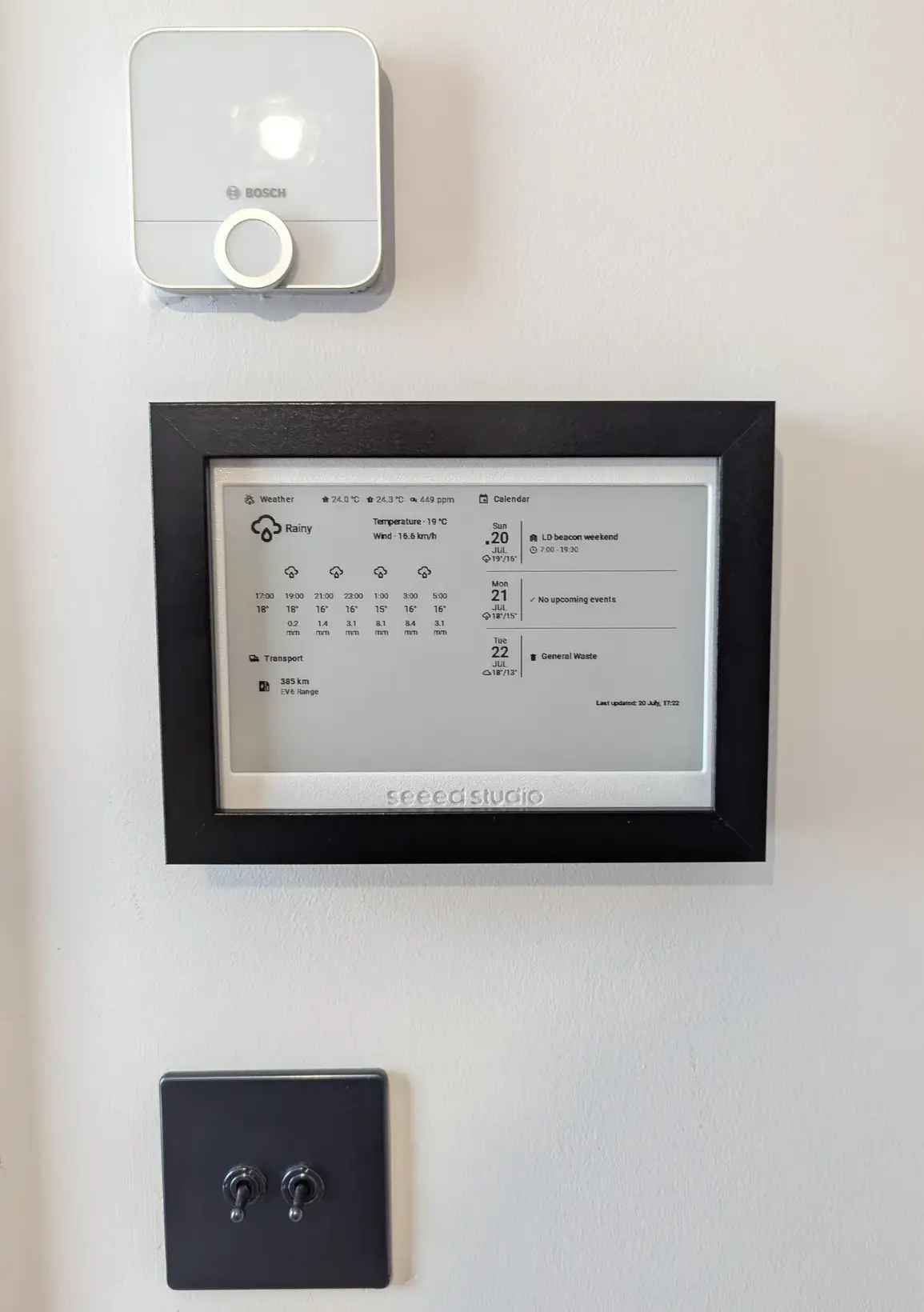
The size of the enclosure also makes it a perfect fit inside a standard IKEA photo frame. This makes it ideal if you want to mount it on a wall, to display information at a glance.
We keep ours near our front entrance, by the stairs, and we use it to display information using Home Assistant. This includes things like the weather for the day, traffic information for our next calendar events (via Waze Live Maps), and the current range on our EV.
To build the dashboard, I used 2 sections, so they would go side by side, and adapted the cards so that they would look ok in black and white. I also added a “Last updated” template card at the bottom right, so I can tell when it last happened.
Last updated: {{ now().strftime('%d %B, %H:%M') }}
The device doesn’t report battery percentage, and as it is e-ink, the screen doesn’t go off when it runs out of power.
The seeedstudio XIAO 7.5'' ePaper panel nicely fitted inside an IKEA photo frame.
Battery Performance
The battery capacity is very decent. I was able to get 15 days out of it using deep sleep. This is done by waking the device for 2 minutes to process the update, and then have it sleep for the next 30 minutes. For the type of information we are using this for, this is frequent enough.
I am currently experimenting with more complex code to keep the display in deep sleep overnight, which should allow me to extend the battery life even further.
ESPHome code
After the update to ESPHome version 2025.7.x, I add to make some changes to the sample code provided by Seeedstudio in their wiki. The PNG decoder kept running out of memory, so I replaced it with BMP, which works just the same and avoids the issue entirely.
Configuration with deep sleep
04-08-2026: added a last seen timestamp sensor. This makes more sense than the timestamp, and allows you to know directly when the device was last updated from the entity.
29-Aug-2025: this code has been updated with manual sensor updates for the diagnostic sensors. The sensors were failing to update as the attempts were happening while wifi was disconnected (during deep sleep). They are now triggered manually each time the wifi connects.
13-Aug-2025: this code has been updated with a script section, kindly shared in Reddit by another user. Instead of using a predefined deep_sleep duration, it is being called based on the current time. This allows you to set a longer period between updates at night, for example.
My ESPHome .yaml code with the 30m deep sleep between updates and a dashboard screenshot being taken by the puppet addon.
substitutions: name: e-ink-display-2 friendly_name: E-ink Display 2esphome: name: ${name} friendly_name: ${friendly_name}esp32: board: seeed_xiao_esp32c3 framework: type: esp-idf# Enable logginglogger:# Enable Home Assistant APIapi: encryption: key: <randomly_generated_string>ota: - platform: esphome password: !secret ota_passwordwifi: ssid: !secret wifi_ssid password: !secret wifi_password# Eink display image from dashboard## Get time from Home Assistanttime: - platform: homeassistant id: homeassistant_time timezone: "Europe/Dublin" # Change to your timezone## Deep sleep componentdeep_sleep: id: deep_sleep_1http_request: verify_ssl: false timeout: 10s watchdog_timeout: 15sonline_image: - id: dashboard_image format: BMP type: BINARY buffer_size: 30000 url: http://192.168.1.xx:10000/eink-1/0?viewport=800x480&eink=2&invert&format=bmp # change this link to your screenshot link update_interval: 60s on_download_finished: - delay: 100ms - component.update: main_display - script.execute: check_time_and_sleepscript: - id: check_time_and_sleep mode: single then: - lambda: |- auto time = id(homeassistant_time).now(); if (!time.is_valid()) { ESP_LOGW("sleep_script", "Time not available, sleeping for 30 minutes"); id(deep_sleep_1).set_sleep_duration(30 * 60 * 1000); id(deep_sleep_1).begin_sleep(); return; } int hour = time.hour; ESP_LOGI("sleep_script", "Current hour: %d", hour); if (hour >= 23 || hour < 5) { ESP_LOGI("sleep_script", "Night time, sleeping for 6.5 hours"); id(deep_sleep_1).set_sleep_duration(390 * 60 * 1000); } else { ESP_LOGI("sleep_script", "Day time, sleeping for 30 minutes"); id(deep_sleep_1).set_sleep_duration(30 * 60 * 1000); } id(deep_sleep_1).begin_sleep(); - id: update_sensors_script mode: single then: - lambda: |- id(sensorip).update(); id(sensorssid).update(); id(sensoruptime).update(); spi: clk_pin: GPIO8 mosi_pin: GPIO10display: - platform: waveshare_epaper id: main_display cs_pin: GPIO3 dc_pin: GPIO5 busy_pin: number: GPIO4 inverted: true reset_pin: GPIO2 model: 7.50inv2 update_interval: never lambda: |- it.image(0, 0, id(dashboard_image)); # Diagnostic Sensorstext_sensor: - platform: version hide_timestamp: true name: "${friendly_name} ESPHome Version" entity_category: diagnostic - platform: wifi_info ip_address: name: "${friendly_name} IP Address" icon: mdi:wifi entity_category: diagnostic id: sensorip update_interval: never ssid: name: "${friendly_name} Connected SSID" icon: mdi:wifi-strength-2 entity_category: diagnostic id: sensorssid update_interval: never - platform: template name: "${friendly_name} Last Seen" entity_category: diagnostic id: sensor_last_seen lambda: |- return id(homeassistant_time).now().strftime("%Y-%m-%d %H:%M:%S");
Faster display updates with partial refresh
If you don’t mind the battery lasting for a shorter amount of time, or if you will always have the device powered via USB, you can use partial/fast refresh to allow quicker screen updates, where only the relevant pixels are updated, without a full refresh (which causes a noticeable effect on the screen, with the whole thing going black and white again for a second). Eventually, the screen will still need a full refresh, but the code takes care of this and will automatically trigger it after a specified number of updates.
Sample use case: desk clock and calendar display
With fast refresh, you could conceivably use the display as a desk clock + calendar, showing the current time (updating every minute) and displaying calendar entries from a synchronised calendar. This would be great for me, as I spend most of my work day in Zoom meetings. Unfortunately, my employer doesn’t allow me to share or sync my work calendar in any way, shape or form, so that’s a no go. Still, I’ve tested the .yaml code version for it:
Configuration for Fast Refresh
ESPHome .yaml code with partial/fast refresh every minute and a dashboard screenshot being taken by the puppet addon.
substitutions: name: e-ink-display-2 friendly_name: E-ink Display 2esphome: name: ${name} friendly_name: ${friendly_name}esp32: board: seeed_xiao_esp32c3 framework: type: esp-idf# Enable logginglogger:# Enable Home Assistant APIapi: encryption: key: <randomly_generated_string>ota: - platform: esphome password: !secret ota_passwordwifi: ssid: !secret wifi_ssid password: !secret wifi_password# Eink display image from dashboardhttp_request: verify_ssl: false timeout: 10s watchdog_timeout: 15sonline_image: - id: dashboard_image format: BMP type: BINARY buffer_size: 30000 url: http://192.168.x.xxx:10000/eink-2/0?viewport=800x480&eink=2&invert&format=bmp&next=60 #change this link to your screenshot link update_interval: 60s on_download_finished: - delay: 100ms - component.update: main_displayfont: - file: "gfonts://Roboto" id: status_font size: 20spi: clk_pin: GPIO8 mosi_pin: GPIO10display: - platform: waveshare_epaper id: main_display cs_pin: GPIO3 dc_pin: GPIO5 busy_pin: number: GPIO4 inverted: true reset_pin: GPIO2 model: 7.50inv2p full_update_every: 60 #the screen will only do a full refresh on every 60th update, ie once per hour. update_interval: 60s lambda: |- it.image(0, 0, id(dashboard_image)); # Diagnostic Sensorstext_sensor: - platform: version hide_timestamp: true name: "${friendly_name} ESPHome Version" entity_category: diagnostic - platform: wifi_info ip_address: name: "${friendly_name} IP Address" icon: mdi:wifi entity_category: diagnostic ssid: name: "${friendly_name} Connected SSID" icon: mdi:wifi-strength-2 entity_category: diagnosticsensor: - platform: uptime name: "${friendly_name} Uptime" entity_category: diagnostic id: sensoruptime update_interval: 60s
If you are using deep sleep, you cannot use partial/fast refresh, as the two are not compatible.